
Game screensavers
6 self-playing arcade game screensavers for Mac
Snake, paddle ball, block drop, pixel invaders, brick breaker and a 90s-style shooter – arcade classics that play themselves on your idle Mac. Native, in the free SCRNSVRS app. 100 free every month, picked at random from the whole catalogue.
Collection: games4,000+ screensavers in 45 collections
Arcade attract modes were the screensavers of the 80s: the machine played itself to lure you in. These screensavers bring that idea to your Mac. Each one is a small game with a built-in AI that plays endlessly – no input, no high-score pressure, just satisfying motion on an idle screen.
All six are original tributes with their own pixel art, rebuilt natively for macOS Tahoe with crisp scaling and optional CRT or LCD looks.
1. Snake Classic

For a whole generation, Snake was the first video game they carried in their pocket. Snake Classic brings back that pea-green LCD, the chunky pixels and the satisfying crunch of a snake that grows one segment at a time – except here, the snake plays itself, and surprisingly well.
It is the most nostalgic screensaver in the collection, and the most hypnotic: the snake hunts for food, coils around itself and, every so often, makes one greedy move too many.
2. Retro Shooter
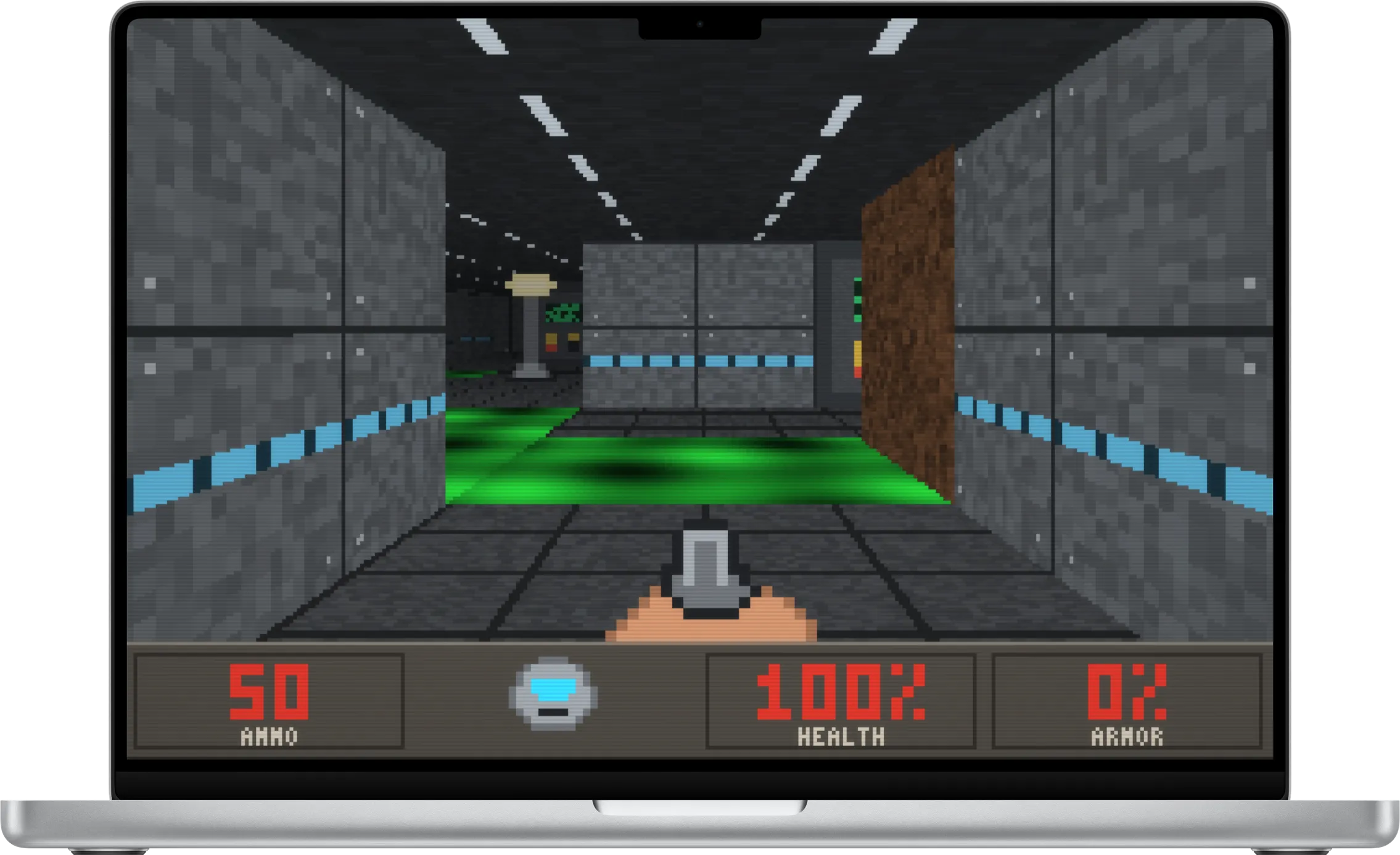
The early-90s first-person shooters changed games forever: chunky textures, grid-based levels and a pace nothing else had. Retro Shooter is an original homage to that era – it wanders through tiled corridors in first person, with pixel-art enemies and a classic status bar, entirely on autopilot.
It is the most technically impressive scene in the collection: a real-time raycaster written from scratch for Metal, running at your display's full resolution.
3. Block Drop
Falling blocks might be the most-played puzzle idea in history, and it is a fantastic thing to watch someone else play. In Block Drop, a calm AI places every piece, clears lines in neat cascades and keeps the well tidy – the kind of game you'd never manage yourself at that speed.
The neon pieces glow against a dark well, which makes it one of the best-looking game screensavers on a large display.
4. Pixel Invaders
Rows of pixel aliens marching sideways and stepping down, a lone cannon defending four crumbling bunkers: few images are as instantly recognisable as the fixed shooter of the late 70s. Pixel Invaders is our own crisp, pixel-art tribute, played on autopilot.
The fun is in the details – the bunkers crumble shot by shot, the aliens drop bombs as they march, and the score climbs wave after wave.
5. Paddle Ball
Two paddles, one ball, zero rules to learn: the 1972 arcade tennis game is where video games began. Paddle Ball is its endless rally – two computer players returning the ball forever, with a score that ticks up as one of them occasionally misjudges an angle.
It is minimal, black-and-white and impossible not to watch for "just one more point". Turn up the playback speed for a frantic rally, or slow it down for something almost meditative.
6. Brick Breaker
A paddle, a ball and a wall of rainbow bricks: the arcade brick-buster is simple enough to understand from across the room, and satisfying enough to keep watching. Brick Breaker's paddle rarely misses, so most rounds end the same satisfying way – with the last brick knocked out and a fresh wall to clear.
It is the most colourful game in the collection, and a great pick for a shared screen in an office or studio.
7. Light Cycles
Four glowing bikes racing round a grid, walling each other in with their trails until one is left.
In the app you can adjust the speed. It runs natively on your Mac, drawn live in real time – no video, never quite the same twice.
8. Minesweeper
A minefield solving itself – numbers revealed, flags planted, and the odd unlucky guess.
In the app you can adjust the moves per second. It runs natively on your Mac, drawn live in real time – no video, never quite the same twice.
9. Four in a Row
Two players dropping discs, blocking each other’s lines, until someone gets four in a row.
It runs natively on your Mac, drawn live in real time – no video, never quite the same twice.
10. Rock Blaster
A little vector ship in the middle of a rock field, turning and firing as the rocks split apart.
It runs natively on your Mac, drawn live in real time – no video, never quite the same twice.
11. Gap Glider
A little bird flapping its way through gap after gap between the pipes, keeping score as it goes.
It runs natively on your Mac, drawn live in real time – no video, never quite the same twice.
12. Line Duel
Glowing lines steered by computer players curve around the arena, leaving trails with little gaps; whoever crashes first loses the round.
In the app you can adjust the players and speed. It runs natively on your Mac, drawn live in real time – no video, never quite the same twice.
13. Go
Two computer players placing black and white stones on a wooden board, surrounding territory and capturing groups, one game after another.
In the app you can adjust the board and seconds per move. It runs natively on your Mac, drawn live in real time – no video, never quite the same twice.
14. Reversi
Two computer players flipping discs on a green board – every move outflanks a line of the opponent’s discs, which turn over one by one.
In the app you can adjust the seconds per move. It runs natively on your Mac, drawn live in real time – no video, never quite the same twice.
15. Checkers
Two computer players at draughts – diagonal steps, forced captures, double jumps and crowned kings – one game after another.
In the app you can adjust the seconds per move. It runs natively on your Mac, drawn live in real time – no video, never quite the same twice.
16. Dots and Boxes
The pen-and-paper game played by two computer players: lines drawn between dots, and whoever closes a box claims it and goes again.
In the app you can adjust the boxes across and seconds per line. It runs natively on your Mac, drawn live in real time – no video, never quite the same twice.
17. Sky Road
A self-playing nineties sky runner: a glowing ball bouncing along a floating checkered road over a pastel sky, hopping every gap as the road winds and the pace builds.
It runs natively on your Mac, drawn live in real time – no video, never quite the same twice.
18. Hex Maze
A maze of hexagonal cells carved out before your eyes, then solved – a bright path finding its way from corner to corner.
In the app you can adjust the maze size and speed. It runs natively on your Mac, drawn live in real time – no video, never quite the same twice.
19. Circular Maze
A round maze of concentric rings, carved outward from the centre and then solved – a glowing path spiralling from the middle to the rim.
In the app you can adjust the rings and speed. It runs natively on your Mac, drawn live in real time – no video, never quite the same twice.
20. Tic-Tac-Toe
Two players who mostly know the perfect game – and now and then slip – chalking up noughts and crosses.
It runs natively on your Mac, drawn live in real time – no video, never quite the same twice.
21. Sliding Puzzle
The fifteen puzzle shuffling itself into a mess, then sliding patiently back into order.
It runs natively on your Mac, drawn live in real time – no video, never quite the same twice.
22. Sudoku Solver
A pencil-and-paper sudoku filling itself in – trying digits, backing out of dead ends, finishing the grid.
In the app you can adjust the steps per second. It runs natively on your Mac, drawn live in real time – no video, never quite the same twice.
23. Lunar Lander
An autopilot easing a little lander down onto the one flat pad among jagged hills – again and again.
It runs natively on your Mac, drawn live in real time – no video, never quite the same twice.
24. Frog Crossing
A careful frog hopping through traffic and across drifting logs to the safety of the lily bays.
It runs natively on your Mac, drawn live in real time – no video, never quite the same twice.
25. Match Three
A board of bright gems playing itself – swapping, matching, cascading and tumbling down.
It runs natively on your Mac, drawn live in real time – no video, never quite the same twice.
26. Towers of Hanoi
A stack of coloured discs moves from peg to peg in the shortest possible sequence, each disc lifting, gliding over and settling, then the finished tower sets off for the next peg.
In the app you can adjust the colours, discs and speed. It runs natively on your Mac, drawn live in real time – no video, never quite the same twice.
27. Picture Logic
A grid logic puzzle fills itself in line by line from its row and column clues, marking certain cells and dotting the empty ones, until an abstract symmetric motif stands complete.
In the app you can adjust the colours, grid size and speed. It runs natively on your Mac, drawn live in real time – no video, never quite the same twice.
28. Toggle Grid
A square of glowing buttons solves itself one calm press at a time, every press flipping the button and its four neighbours, until the whole grid goes dark and a new pattern lights up.
In the app you can adjust the colours, grid size and speed. It runs natively on your Mac, drawn live in real time – no video, never quite the same twice.
29. Nine Men's Morris
Two unhurried computer players take turns on the old board of three nested squares, placing their nine pieces, sliding them along the lines and lifting an opposing piece whenever three in a row close a mill.
In the app you can adjust the colours, move speed and skill. It runs natively on your Mac, drawn live in real time – no video, never quite the same twice.
30. Hex Board
On a diamond of hexagonal cells two computer players take turns placing stones, each racing to link its own pair of opposite edges, until one chain reaches across, glows along its path and the board clears.
In the app you can adjust the colours, board size, move speed and skill. It runs natively on your Mac, drawn live in real time – no video, never quite the same twice.
31. Domino Topple
Long lines of standing tiles wind across the floor and topple one after another in slow motion, each fallen tile showing a coloured face so a pattern spreads behind the cascade, before they all rise again in reverse.
In the app you can adjust the layout, tiles per second and camera speed. It runs natively on your Mac, drawn live in real time – no video, never quite the same twice.
The verdict
For pure nostalgia, start with Snake Classic. For something to watch with colleagues, Brick Breaker and Block Drop are the crowd-pleasers – and if you want to show off what your Mac can do, Retro Shooter is the one.
All six are original tributes with their own pixel art, in the free SCRNSVRS app. Each one plays itself, so all you have to do is watch. 100 free every month, picked at random from the whole catalogue. When one of these is in that set it is free. Nothing stays free past its month.
Frequently asked questions
Do I have to play these games?
No – that's the point. Each game is played by a small AI while your Mac is idle: the snake finds its food, the paddles rally, the blocks get placed and the cannon defends.
Is there a paddle-game clock screensaver for Mac?
Yes. Paddle Ball rallies endlessly and its score shows the current time: a paddle misses on purpose whenever the minute or hour changes.
Are these the original games?
They're original tributes to the arcade and phone classics, with all artwork made by SCRNSVRS – no copied sprites, logos or code.
Are they free?
They are free when they are in that month's set of 100. The SCRNSVRS app is free. 100 free every month, picked at random from the whole catalogue. The set changes at midnight UTC on the 1st, and nothing stays free past its month. Every screensaver is also free for your first 7 days.